Read operations
Supported discovery adapters read provider inventory and selected metadata. They do not invoke agents, deploy resources, or change provider configuration.
 CatProof is a member of NVIDIA Inception.Explore the program
 Read-only discovery. Encrypted credentials. Clear control.
Connecting a source means trusting CatProof with a credential. Here is how the hosted application stores it, uses it, and keeps it separate from the inventory your team sees.
Supported discovery adapters read provider inventory and selected metadata. They do not invoke agents, deploy resources, or change provider configuration.
Saved credential values use authenticated encryption in a separate PostgreSQL table. The encryption key is held separately in service configuration.
Only a registry owner can save, replace, or remove credentials. Saved values are not returned through the application’s credential API.
The diagram separates encrypted credential storage, in-memory use, and the inventory that users can view or export.
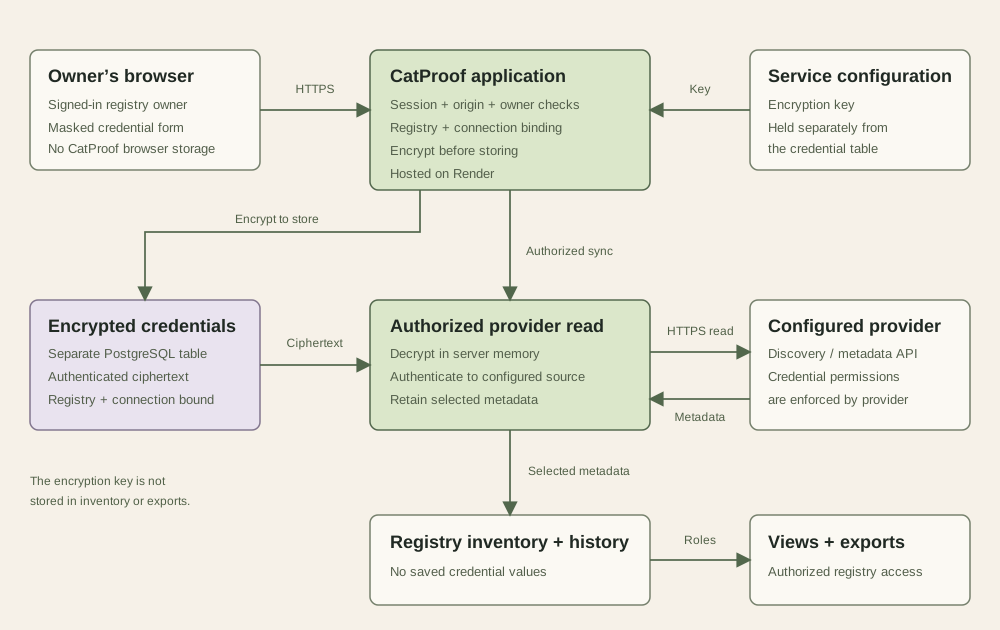
On small screens, scroll the diagram horizontally or read the steps below.
The hosted application checks the signed-in session, request origin, registry membership, owner role, and target connection before saving.
Fernet authenticated encryption protects the saved credential payload. The payload includes its registry and connection; those bindings are checked when it is loaded.
An authorized provider read loads the credential server-side. CatProof must decrypt it in memory to authenticate the request to that provider.
Inventory, CSV exports, registry snapshots, and audit details omit saved credential values. Source metadata and local ownership decisions remain distinct.
This is server-side encryption, not zero-knowledge storage. Operators with both database access and the service encryption key can decrypt saved credentials. The current design does not use a managed HSM/KMS vault for connector secrets.
CatProof’s behavior and your provider’s permissions work together. Both matter when deciding what access to grant.
Supported connectors perform discovery and enrichment reads. Some provider APIs use POST to submit a search or metadata query; the operation’s purpose determines whether it is a read.
Recording an owner, review, or lifecycle decision changes the CatProof record. It does not change the source agent or stop its execution.
Choose a dedicated credential with the minimum read permissions for the intended account, workspace, project, or resource scope.
A broadly privileged API key remains broadly privileged. CatProof’s read-only behavior does not reduce that key’s permissions at the provider. Some providers do not offer granular read-only keys; review their limitations before connecting.
Scope is connector-specific. One connection does not establish complete organization-wide discovery. Review each connector’s coverage and authentication requirements →
Credential operations use the authenticated registry, validate the connection belongs to it, and recheck the owner role. Inventory uses tenant-scoped keys and PostgreSQL row-level security.
The hosted request policy requires public HTTPS destinations on port 443. Shared connector transport rejects redirects and cross-origin pagination before forwarding credentials.
Credential fields are masked, are not saved in browser storage by CatProof, and are cleared after submission, closing the dialog, or hiding the tab. Stored values are not shown again.
Credential changes record an audit event without including the credential value. Shared connector errors use sanitized messages rather than echoing provider response bodies.
These are application safeguards, not a claim that an administrator or a compromised application cannot access data. Connect only to provider endpoints you are authorized to use.
Removal blocks fallback to older operator-configured credentials for that connection. Previously imported inventory and history remain; removal is not an immediate erasure guarantee for historical backups.
To invalidate a key everywhere, revoke it in the source provider’s console. Removing it from CatProof does not revoke the provider-issued key.
Prefer dedicated, limited credentials. Use short-lived credentials where supported. Expired tokens currently need to be replaced in CatProof; automatic renewal is not generally available.
Connection and credential setup →The application does not return saved values through its credential API, inventory, or exports. Only registry owners can save, replace, or remove credentials. Authorized team members may use inventory features and trigger reads according to their role; that is different from retrieving the saved key.
This page documents the implemented application safeguards. It is not evidence of a completed independent security audit or a CatProof compliance certification. A hosting provider’s certifications do not automatically certify CatProof. Contact us about your requirements before providing access.
Saved connector credentials use Fernet authenticated encryption from the Python cryptography library. The service encryption key is stored separately in service configuration. This is a service-managed key, not a customer-managed key or a per-registry vault. Read the Fernet documentation ↗
Yes. The interactive demo uses fictional data and makes no provider calls. You can also review the self-hosted Community Edition and its setup requirements. Hosted and self-hosted operating responsibilities differ.
Email info@catproof.ai with your requirements or a description of the issue. Do not include API keys, tokens, passwords, or customer data in an email or chat message. Read the Privacy Policy →
Application architecture reviewed . This explanation reflects a code and documentation review; it is not an independent assessment of production infrastructure, operational access, or backup retention.
Review the source, its permissions, and the evidence you need.